Tuesday, August 22, 2017

Automating API Monitoring using MuleSoft Flow Designer

1.0 Overview
I have created a Mule application that pings URL to ensure that they are up, and if the URL is down for some reason the Mule Application is capable of sending out email notification. At the time of this writing the Mule application could send out email notification, I plan to incorporate more types of notification as I continue to improve it.


The source code is fully obtainable via the following github link.
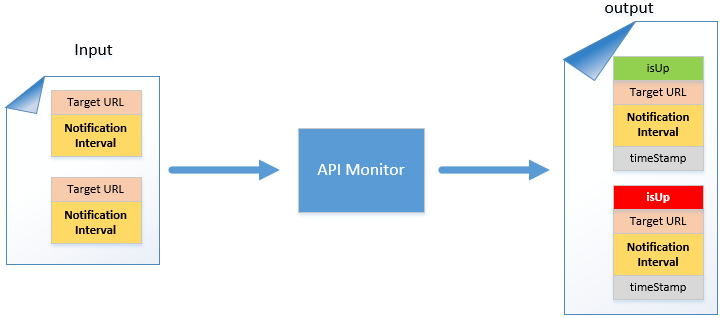
Figure 1.0


Figure 1.0 shows an abstract diagram on what the API monitor expects. Users would submit a json payload consisting of an array of target urls to be pinged by API monitor. In conjunction with the target url users would also need to specify notification interval, the notification interval is useful in that users won't be spammed with notification messages if the ping very frequent e.g. 5 seconds. For instance if the notification interval is set to 1 hour, and users are trying to ping a target url that is down for every minute, and if the target url is down for 2 hours, then users would essentially only receive 2 notification emails (instead of getting one email every minute where the target url is down). Figure 1.0a shows an example of an input payload.
Figure 1.0a


If the URL is pingable then API monitor would set isUp to true (green), otherwise it would set isUp to false and send out a notification to the user. The output payload from API monitor would contain enriched data like the timestamp on which the URL is pinged and also the status of the url.


The returned notification timestamp would be the same as previous notification timestamp if the notification interval has not expired. If the notification interval has expired then it would be updated with new timestamp.


The output json payload would also have the latest timestamp on the current ping attempt. Figure 1.0b shows an example of a JSON output payload.
Figure 1.0b

2.0 Using Flow Designer to Automate Pinging

Now that you have an api monitor that is capable of pinging URLs and sending out notification if the URL is down, next step is to automate the pinging. We can easily achieve this via the new Design Center’s mule flow (assuming that you will be deploying the API monitor into cloudhub). Lets step through on how we can achieve this, first from cloudhub you have to select “Design Center” (depicted in figure 2.0).  
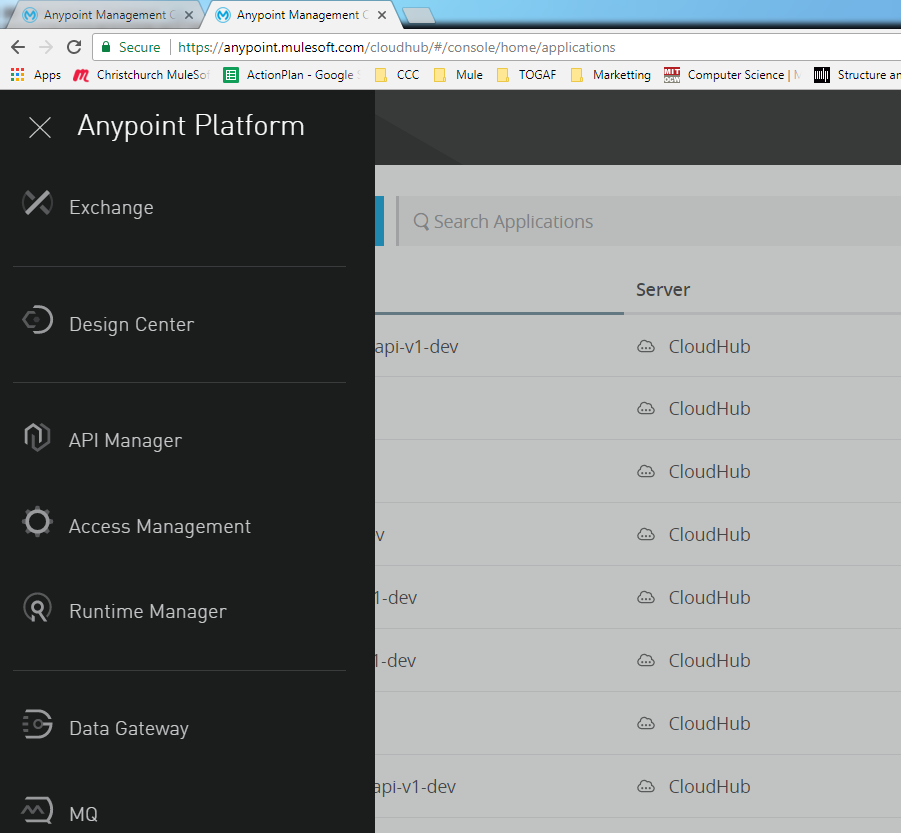
Figure 2.0


When in design center click on create button on your right (Figure 2.0a), and select Mule Application.
Figure 2.0a


You will then be prompted with a pop-up dialog, keyin the same text as per depicted in Figure 2.0b
Figure 2.0b
Select scheduler as the first component and set it to 10 seconds as per Figure 2.0c
Figure 2.0c

Next select a HTTP requester component, key in the URL as per figure 2.0d.

Figure 2.0d


The if you see a text box marked with f(x) on it’s right-hand side, like the one you see at Figure 2.0d, it means that it accepts dataweave expression. Flow designer mule applications runs on mule runtime 4.0, to learn more about it go to the following links below.


All the following links I have shared above is for Mule 4.0. You need to click on the map button beside the f(x) sign (Figure 2.0d). When you click on the map button you will see the following pop up dialog in figure 2.0e.
Figure 2.0e
Click on the script tab and cut and paste your desired payload into the middle pane, and this will be the payload that would be submitted to the API manager every 10 seconds interval to ping the list of URL you have specified in your payload.


When you finish your Flow Desinger configuration it would look like the following figure 2.0f.
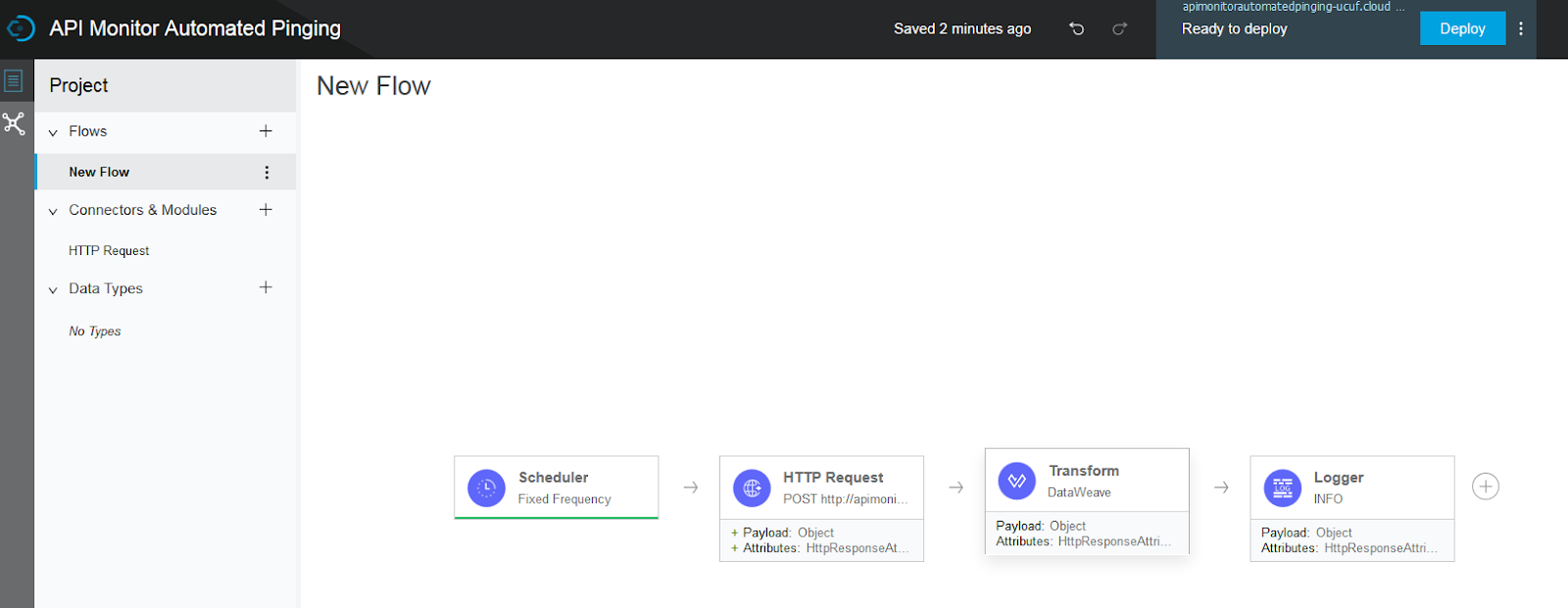
Figure 2.0f
You need to click on the deploy button on the top right of the screen shown in figure 2.0f. Once the application is deployed you will see, the small green marking all the message processors indicating that they have been executed successfully as shown in figure 2.0g.
Figure 2.0g


3.0 Running Flow Designer Application

Right after you click deploy at figure 2.0f, cloudhub would deploy an instance of your flow designer mule application at the runtime manager. If you go to your run time manager in cloudhub you will see your application at Figure 3.0a.


Figure 3.0a
If you click into it, and browse to the Logs Menu at figure 3.0b, you will see the output payload returned by the api monitor application created earlier.
Figure 3.0b


4.0 Conclusion


If you follow all the setup steps in the earlier sections, your flow designer application is actually running on the Design environment. You could download and version your application via the download icon at the top right of the cloudhub screen, and you could also promote it to other environments by clicking on the promote icon. And this is how you could easily automate URL/API monitoring.

Monday, August 21, 2017

1st Christchurch, NZ MuleSoft Meetup

Date: 21st August 2017

Venue: Christchurch City Council, Function Room, (Entrance from Arts Center)

Today’s meet up starts at 5.30p.m. the turn up is great, we have a mixture of people from different roles, from students, to developers, testers, team leaders and managers, a nice mixture of crowd to bring in different concerns towards the subject of systems integration. Thank you again to all the participants for taking the time to attend this event.


As I have mentioned I try to run each meet up at least 3 topics, having two non-development related topics about MuleSoft and 1 development related topic.This is so that the MuleSoft meetup stays relevant to both non-development and development personnel who interacts with MuleSoft daily.


We started the event by talking about the MuleSoft training curriculum, the following link will take you the the slides I have used for our first discussion topic.


As I have mentioned if you are starting a development team or if you are evaluating MuleSoft as an integration product/framework, there are a few free trainings that could start you right off, they are accessible via the following link.


Next we have talked about the Champion program that is a gamification of developers community the slide deck that I have used for this presentation is accessible via the following link.


The final topic we talked about MUNIT testing as a tool that is flexible enough for you to use it from end-to-end testing, service testing and unit testing. The slides that I have used for this session is accessible via the following link.


If you want more details about MUNIT mocking, you can read it from an article that I have written at the following link.


Thank you again for taking the time to attend this meet up. Look forward to seeing you for the next meetup. I am reachable via the following link


More pictures from the meetup can be obtained from the following link.

Tuesday, August 8, 2017

Setting Rate Limiting in Cloudhub (to prevent DoS attack)

1.0 Overview
The MuleSoft cloudhub environment at an abstract level consist of 3 main components, if your Mule Application is being exposed as a Rest API endpoint then you would most likely be using the API manager.


Figure 1.0
API Manager allows the user to create RAML definition files as well as policies, as there are many reference documents about RAML definition, I will not talk about that here but instead, we will look at policies. The API Gateway components are given the least loved by users and that's because it's not exposed for usage compared to its more famous counterpart (the API manager and the Runtime Manager).


The API Gateway is a component that implements the policies that are configured in API Manager. Figure 1.0 shows a typical user request to access a mule application that is running on the Runtime manager. At (2) the API gateway would validate and authorize users request, if the request is authorized, the gateway would then allow the user request to proceed (3) to the Mule Application. But the user request does not meet the policy specified by the API gateway then it would be rejected by the API Gateway and a 4XX HTTP response code (and its associated message) would be sent back to the user.


2.0 Setting up SLA Tier Based Rate Limiting


With the understanding that we have gained from section 1.0, we would now talk about the rate limiting policy and SLA Tiers. As it’s name suggests, rate limiting policies are implemented so that the API gateway could reject a request if it is deemed too frequent given a duration of time. Figure 2.0 shows a rate limiting SLA based policy being configured,

Figure 2.0
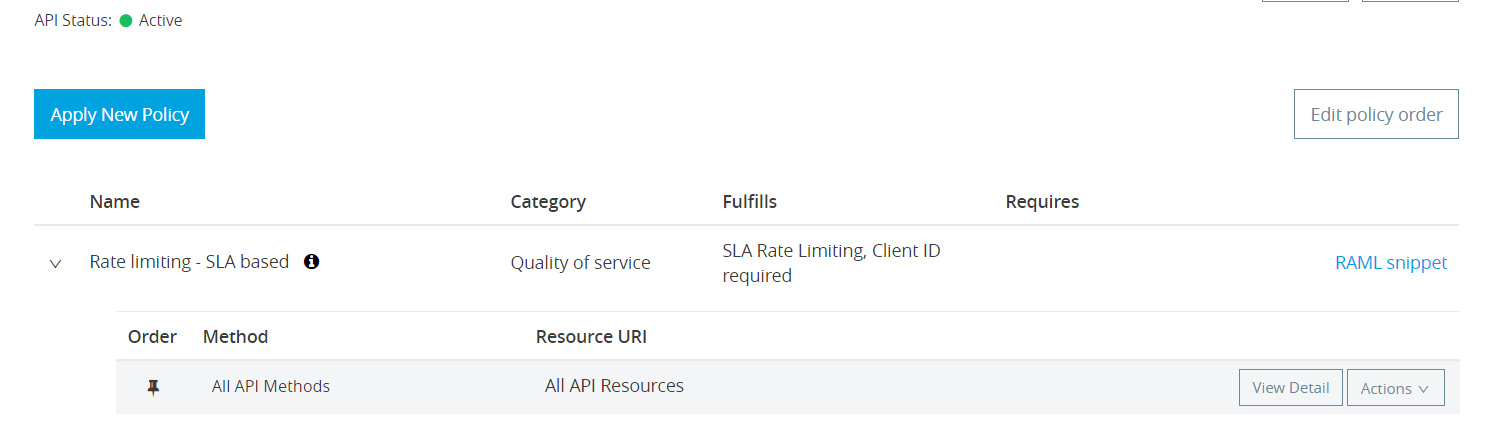
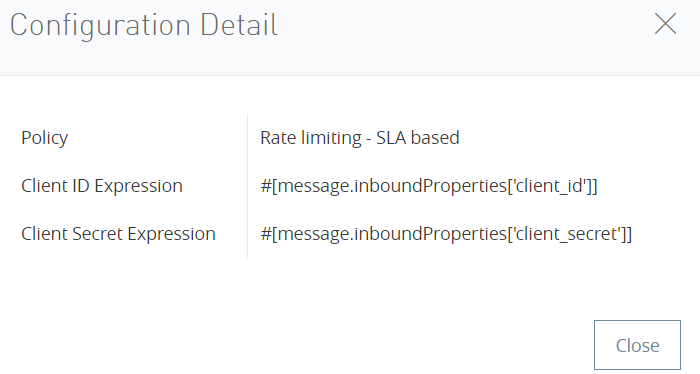
The details of this configuration is as depicted in Figure 2.01.
Figure 2.0a
For rate limiting to happen the API gateway need a form of identification for requesters who are making the request, in which it intuitively enforces users to submit a client id and client secret to the api for all request that they will be issuing. If the API gateway sees too many requests submitted by a particular client id it would then reject the request until the specified duration is has been reset.


The policy that we have put in place at Figure 2.0 lays the foundation for setting up SLA tiers. Figure 2.0b shows two SLA tiers that are configured.
Figure 2.0b
Settings for the GOLD SLA tier allows a user to send 5k request per hour, if users of GOLD SLA tier sent 5001 requests within one hour then the request number 5001 would be rejected (Figure 2.0c depicts GOLD tier settings).
Figure 2.0c
API users that have subscribed to Silver tier would only be allowed to send 1000 request per hour (settings for the silver tier is as per Figure 2.0d).
Figure 2.0d


3.0 Conclusion

At the time of this writing, there are two types of rate limiting policies.
  • Rate Limiting policy - The simplest form of rate limiting policies applies as a blanket policy across all API users, this policy cannot be used in conjunction with SLA tiers. Rate limits of SLA Tiers will always be ignored if this policy is implemented (as it has higher precedence when compared to SLA Tiers).
  • SLA Based Rate Limiting policy - Rate limiting is based on SLA tier subscriptions that is allocated to the API user, which is what was demonstrated in this document.


I would obviously recommend the usage of SLA Based rate limiting as we could apportion the usage of the API according to user/usage groups on a case by case basis. The other benefit of having rate limiting in place is to prevent a denial of service (DoS) attack.

Monday, August 7, 2017

MuleSoft Caching Strategy for Performance Improvement

1.0 Overview

This article will talk about how to implement caching in mulesoft. If we expose API to external users especially API that allows users to get information, then I would highly recommend you implement caching, this is to prevent request from hammering the backend systems.

Figure 1.0

A cache is like an intermediary endpoint that catches your application response based on a particular request, when a request is cached then further request for the same data would be retrieved from a cache instead of the actual end point (as illustrated in Figure 1.0).

MuleSoft cache response by using the request as a key (as depicted in Figure 1.0), User 1 triggered a new request (“Request ABC”) for the first time, when the request go through the cache it would result in a “cache miss”, when this happens this the request would be forwarded to the later application logic to retrieve the necessary response data to full fill the request ( in step 2, 3, 4,).

In Step 5, is where this new request would be cached, and the cache is actually a map with the request (“Request ABC”) as the key and the response (“Response ABC”) as the value. When User 2 submits the same request via step 7, it would then result in a “Cache Hit” when this happens cache returns the cache response back to “User 2”, hence eliminating the network and processing latency (from having to go through step 1 to 6).

2.0 Types of Cache Store Provided By MuleSoft

MuleSoft provides 3 ways to cache your application response
  • In memory caching - easiest form of caching, zero to minimal setup required, not recommended for production. The cache
  • Managed Store caching - this is an out of the box mulesoft persisted caching, which means after you restart the run time on which your application is running the cache is still persisted.
  • Object Store Caching - You have to write your own object store or use mule’s default object store.
  • File Store Caching - As the name suggest, it stores your cached data in an object store.

3.0 Mule Demo Application

Figure 3.0 depicts the mule application that I have built to demonstrate the caching functionality.
Figure 3.0

The groovy script just generates a random number. The logger in the front and back of the flow will show evidence of data being retrieve from cache when it is not writing into the console. The application also shows a graphical Cache Scope, which envelopes all of the message processor in the flow, which implies caching of the the end payload result that would be retuned from any of it’s message processors.

You may download the full source code from the following link.

In order to configure an application for caching you need to set up 2 things in your mule application and they are the
  • Global object-store-caching-strategy & the
   <ee:object-store-caching-strategy name="Caching_Strategy" doc:name="Caching Strategy">
       <managed-store storeName="demoCache" persistent="true" maxEntries="10000" entryTTL="60000000" expirationInterval="600000"/>
   </ee:object-store-caching-strategy
  • Cache scope
...
<ee:cache cachingStrategy-ref="Caching_Strategy" filterExpression="#[Boolean.parseBoolean(message.inboundProperties.'http.query.params'.fromCache)]" doc:name="Cache">
...
       </ee:cache>
..
3.1 Setting up the Global object-store-caching-strategy

The demo application that I have created, in essence is production ready, I have used the managed stored for persistence. Which means the cached payload would be persisted on to disc when the application is turned off.

There are 3 settings that I want you to note and they are
  • maxEntries - which denotes the number of request and response you want the cache to store
  • entryTTL - which denotes the time to live of a cached request and response item, here I have set it to be 60k seconds
  • expirationInterval - this is where people find it hard wrap their heads around, this field is actually for the dormant “Cache Officer” to wake up and sweep off (clean) expired cache, here I have instructed the “Cache Officer” to clean up the cache (delete expired items) every 600 seconds.

3.2 Setting up the Cache Scope

Here the developer need to envelope all the message processors that would be required for caching (hence its name cache scope). In this demo application I have allowed the user to post in a boolean value to the “filterExpression” cache scope so as to allow users to turn on and turn off caching when necessary. When “filterExpression” is set to true the mule application would service user request via a cache response, if there is a “Cache Hit”, but in the event of a “Cache Miss”, the operation would proceed as usual.

When the “filterExpression” is set to false, the user request would still be passed on to the following operations in the cache scope regardless of “Cache Hit” or “Cache Miss” results. The “filterExpression” is akin to a manual override field that allows us to override caching behaviour.

4.0 Types of Data for Caching

This is probably the most important section for you to read. MuleSoft Caching scope can only cache “Non-Consumable” response payloads, it cannot cache “Consumable” response payloads. This is a very important fact to note, the MuleSoft documentation says it, but it does not give further elaboration on the concept of “Consumable” and “Non-Consumable” payloads.

  • Consumable - Byte array or steams type of payload (usually generate from HTTP responses or dataweave outputs)

  • Non-Consumable - Sting (java.lang.String)

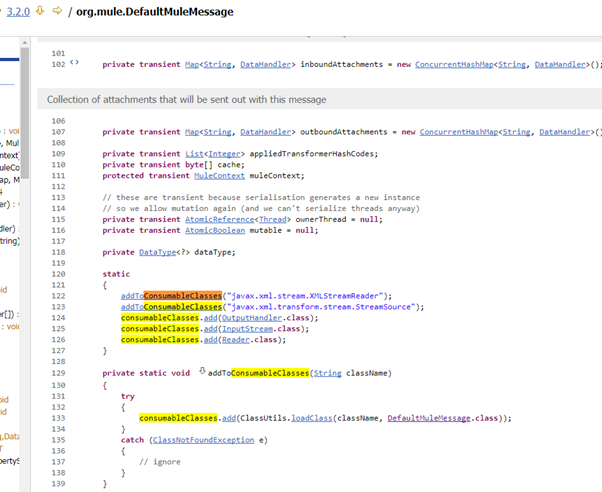
When I dig further into MuleSoft codes this is what I found, the cache scope implements a Consumable Message Filter.

Which invokes an isConsumable() method from the org.mule.DefaultMessage class.
As I dig deeper into the class, it actually calls another private method isConsumedFromAdditional(). Which validates the payload Class type against an array list of preconfigured types.
This is where I finally traced to down to the list of preconfigured ArrayList with payload class types that would be identified as consumable.
This is how the cache filter identifies consumable and non-consumable payload types.

5.0 Conclusion

Only non-consumable payload can be cached, and instance of a non-consumable payload at the time of this writing is java.lang.String payloads. In-Memory caching (which is the default caching method if nothing is configured) should not be applied to production, because it will use up all your production memory resources.

Tuesday, July 11, 2017

Munit A MuleSoft test Strategy

The Video talks about test strategy for testing MuleSoft Application, and how you can use Munit to do End to end, service and unit testing. It also covers the topic of mocking external outbound endpoints for service testing.

Thursday, July 6, 2017

Building Microservices recommended reading

Building Microservices: Designing Fine-Grained SystemsBuilding Microservices: Designing Fine-Grained Systems by Sam Newman
My rating: 5 of 5 stars

This is a very good book and covers a whole range of topics from architecture, development, devops, and run and maintain operations, it is definitely a must read for each and every aspiring solution architect.

View all my reviews