Showing posts with label Groovy. Show all posts

Tuesday, May 22, 2018

Creating Reusable Groovy Scripts in MuleSoft (3.9)

1.0  Overview
MuleSoft developers around the world would be able to identify with me their challenges and issues when they are infusing Groovy scripts into their Mule applications. The challenge here is not so much about creating snippets of Groovy scripts in the mule application but more about creating reusable groovy scripts in MuleSoft. As of this writing there is no online content that will teach you how to create reusable Groovy scripts, the search results that appears would talk about SOAP UI groovy scripts but you will find nothing that is relevant to what you need.
This article would attempt to teach the reader on how to write reusable groovy scripts and the best practices in infusing groovy scripts into their Mule applications.

2.0 Installing the groovy IDE plug-in

Launch the Anypoint IDE, and at the top menu on the upper left hand conner go to Help > Install New Software, this will launch the “Install” pop up dialog, once there click on the add button on the right hand corner of the first text box (as depicted in Figure 2.0a).
Figure 2.0a
Once the button is clicked you will see another pop up dialog asking for Name and Location (Figure 2.0b).
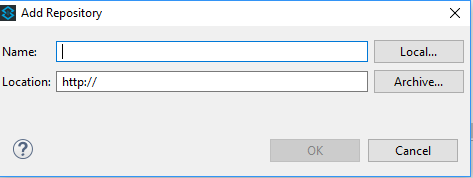
Figure 2.0b
Enter the following name and location into the popup at Figure 2.0b.
  • Name      :groovy plugin
  • Localtion :http://dist.springsource.org/snapshot/GRECLIPSE/e4.5/
Once this is done, you will see that the install dialog would display the following selection for installation, proceed to select all of them (Figure 2.0c), and click next to proceed with installation.
 
Figure 2.0c
Once installation is completed on your Anypoint IDE proceed to the following section (3.0).

3.0 Creating the groovy package

You need to create a new mule project in the Anypoint IDE, once that is done you need to create a subfolder under src/main/resource. The new folder that you are creating would be the package root folder from which your groovy file will reside.
Now Create a new groovy file called “HelloWorld.groovy”. The entire structure of your file would be as the following (Figure 3.0a).
 
Figure 3.0a
Enter the following snippet of code into the file.
package groovystatic String greet(){
        
println "Hello how are you !!!"
        
return "Hello how are you!!!"
}
So what you have essentially done is that by naming the file “HelloWorld.groovy” you are implicitly creating a java class called “HelloWorld” when you create method/functions in the file you are essentially creating function/methods in the “HelloWorld” class. The first statement in the class is the package name which should be the same as your folder name.

4.0 Incorporating the groovy script

Right after creating the groovy script file in section 3.0 we are now ready to incorporate it into our mule application. We will create a simple mule application that looks like the following (Figure 4.0a).
Figure 4.0a
The second message processor is the “groovy scripting message processor”, in the groovy scripting message processor configuration are as displayed below (Figure 4.0b).
Figure 4.0b
And it is that easy to reuse groovy scripts, if you follow my way of creating reusable scripts, you will no longer need to use the “Script File” configuration (displayed in Figure 4.0b).
Full Mule XML code are as listed in the following snipped.
<?xml version="1.0" encoding="UTF-8"?>
<mule xmlns:http="http://www.mulesoft.org/schema/mule/http" xmlns:scripting="http://www.mulesoft.org/schema/mule/scripting" xmlns="http://www.mulesoft.org/schema/mule/core" xmlns:doc="http://www.mulesoft.org/schema/mule/documentation"
        xmlns:spring=
"http://www.springframework.org/schema/beans"
        xmlns:xsi=
"http://www.w3.org/2001/XMLSchema-instance"
        xsi:schemaLocation=
"http://www.springframework.org/schema/beans http://www.springframework.org/schema/beans/spring-beans-current.xsd
http://www.mulesoft.org/schema/mule/core http://www.mulesoft.org/schema/mule/core/current/mule.xsd
http://www.mulesoft.org/schema/mule/http http://www.mulesoft.org/schema/mule/http/current/mule-http.xsd
http://www.mulesoft.org/schema/mule/scripting http://www.mulesoft.org/schema/mule/scripting/current/mule-scripting.xsd"
>
   
<http:listener-config name="HTTP_Listener_Configuration" host="0.0.0.0" port="8081" doc:name="HTTP Listener Configuration"/>
   
<flow name="testgroovyFlow">
       
<http:listener config-ref="HTTP_Listener_Configuration" path="/test" doc:name="HTTP"/>
       
<scripting:component doc:name="Groovy">
           
<scripting:script engine="Groovy"><![CDATA[groovy.HelloWorld.greet()]]></scripting:script>
       
</scripting:component>
   
</flow>
</mule>

5.0 Debugging the Groovy Script

If you follow what I have showed you so far and incorporate the practice in all your mule applications you could even debug the groovy script that you have written (apparently there are people who believe that they can never debug groovy scripts in mule applications, this article will prove them wrong). If you set breakpoints in the following locations (Figure 4.0a and Figure 5.0a), you will able to stop execution at the following points during runtime.
Figure 5.0a shows the blue dots as breakpoints.
Now run the application in debug mode and in your internet browser, browse to the following URL http://localhost:8081/test. You will now see that the runtime execution stops at the first break point (Figure 5.0b).
 
Figure 5.0b
If you move move forward from the first break point, the debugger will move into the groovy script (Figure 5.0c).
Figure 5.0c
This shows that using the following way in creating groovy scripts in your mule application, not only encourages reuse, but also allows for groovy scripts debugging, this will be really helpful when you have complex groovy scripts to debug.
6.0 Conclusion

When you create groovy scripts using the method I have shown you, then you will only need to enter minimal groovy statements at the groovy message processors, and you could leave all the heavy lifting to the scripts declared in the script files, doing it this way would also allow you to build groovy scripts independently from your mule ide and test the groovy script independently to ensure it works before actually using them in the mule application (this will speed up development time tremendously).

Wednesday, April 5, 2017

Implementing Message Enrichment in MuleSoft

1.0 Overview

Message Enrichment is a common use case for Integration Software. A scenario for message enrichment is depicted at Figure 1.0.
Figure 1.0
There is an incoming payload that must be enriched with certain data before the integration system can pass it on further down the processing chain to an outbound endpoint. The message enricher pattern is depicted states that the original inbound payload is to be retained, but the enriched message is attached as an additional payload before being relayed to an outbound endpoint. MuleSoft offers this support via the message enricher scope. That is all fine but what if we want to modify the original payload. The following sections are lab session showing the users how this can be done.

2.0 Hypothetical Scenario

Figure 2.0
Lets say you are an integration developer and have been challenged to build an integration scenario depicted in figure 2.0.
At Figure 2.0 you have to build an integration module that accepts a inbound payload (1), you will need to fire a call to an external web api (2) to get additional data, so that you could enrich the original inbound payload with the acquired data (3), and further pass it on down to an outbound endpoint (4).
Lets put some meat on this hypothetical scenario, lets say the expected inbound payload is a list of international orders in JSON format like the following (1).

2.1 Inbound Payload

{

"order":[
{
   "country" : "New Zealand",
   "item" :{
                   "currency":"$",
                   "name":"Shovel",
                   "qty":"2",
                   "unitPrice" : "10"
   }
},
{
   "country" : "Malaysia",
   "item" :{
                   "currency":"$",
                   "name":"Satay",
                   "qty":"2",
                   "unitPrice" : "10"
   }
}
]
}


2.2 Additional Enrichment Data

And when the message enrichment processor makes a call to the external web API (2), the data returned by this external web API is as per the following:
{
                "Currency": [
                {"Country":"New Zealand","CurrencyCode":"NZD", "CurrencyDesc":"New Zealand Dollars"},
                {"Country":"Malaysia", "CurrencyCode":"MYR", "CurrencyDesc":"Malaysia Ringgit"},
                {"Country":"Singapore", "CurrencyCode":"SGD", "CurrencyDesc":"Singapore Dollars"},
                ]
}

2.3 Outbound Payload

The Mule' message enricher must take this additional data and selected the correct currency code for all the orders located in inbound payload (3), and as a result of the enrichment operation the payload would be modified to the following.
{
  "order": [
    {
      "country": "New Zealand",
      "item": {
        "currency": "NZD",
        "name": "Shovel",
        "qty": "2",
        "unitPrice": "10"
      }
    },
    {
      "country": "Malaysia",
      "item": {
        "currency": "MYR",
        "name": "Satay",
        "qty": "2",
        "unitPrice": "10"
      }
    }
  ]
}

The orders in the inbound payload with the "currency" value of "$" is replaced with its respective country's currency code.  As described earlier this is a hypothetical scenario but I believe that this scenario will always occur in either one incarnation or another. Section 3.0 will show how this can be done via MuleSoft, so let’s dive in.

3.0 Lab Session

The following picture shows the end result of building of a Mule flow that is capable of processing inbound payload as described in section 2.0.
Figure 3.0
The mule flow is numbered with execution step sequence, this is so that it would be easier for me to walk readers through the processing mechanics of it all.
new com.fasterxml.jackson.databind.ObjectMapper().readValue(flowVars.currencyCode, java.util.HashMap)
def curArrayList = flowVars.JavaCurrencyCode.get("Currency");
for (i = 0; i <curArrayList.size(); i++) {
    def item = curArrayList.get(i);
    System.out.println(item.get("Country"));
    if(payload.country.equals(item.get("Country"))){
      payload.item.currency = item.get("CurrencyCode")
      break;
    }
}
At Figure 3.0, you will be able to see two flows, the main flow is called "messageenrichersFlow" this flow is an implementation of the "Message enricher" pattern. The second flow "ExternalWebAPI" flow is used to simulate a call to an external system and returning a payload of additional data to be populated to the original inbound data.
At (1) and inbound JSON payload (as described in 2.1) is received by  "messageenrichersFlow", at (2) we need to convert the JSON payload to a Java object so that it could be easily manipulated via the "Mule Expression Language". (3) is an implementation of the first message enricher scope with the name of "Msg Enricher: Getting List Of Currency", here I have simulated a call to an external system via a VM endpoint, when this called is relayed to (3.1.1), it will reply back to the main flow with a hardcoded payload at (3.1.2) (the content of the hardcoded payload is as per described in section 2.2).
The currency list returned (section 2.2) is in JSON format I need to convert it into a Java object so that I could programmatically access it for further processing. We cannot use the "JSON to Object" transformer here as it's implicit usage is to transform a message payload, the additional currency list returned from the (3.1.1) is not in the message context of "messageenrichersFlow". The JSON message that is returned is stored in a flow variable "currencyCode" as depicted by Figure 3.1 below.
Figure 3.1
In order to convert the content of flow variable "currencyCode" in to a java collection object we have to create another message enricher (4), in this new message enricher we will use the expression transformer to transform the JSON string to a Java HashMap. The following is the code snippet that is being used in the Expression transformer.

I made use of the Jackson Data bind api to convert the JSON data (in section 2.2) to a Java Hashmap, as a result of executing the Java code the JSON data will be converted to the following Java Object depicted in Figure 3.2 below.
Figure 3.2

This new Java object is then stored in a flow variable called "JavaCurrencyCode".
At number (5) I made use of the "For Each" scope to loop through the inbound payload order by order. I have made use of the Groovy script component (5.1) to implement an inner loop to traverse through he Currency List Java Hashmap, this is so that I could select the correct currency code for the order being inspected, we can’t use the Mule's "For Each" scope as an implementation for the inner loop because it is not capable of executing the break mechanism, I want to be able to break the inner loop when the matching country is found, Groovy scripting is the only option for me (you could also user other script language i.e. Ruby). The following are the Groovy script used.

I just need you to notice that in the groovy script you can reference mule objects directly, for instance line number 5 and 6, you would usually access the payload object via MEL by enclosing it in the following format #[...]. Here in Groovy script you are able to access it directly, how cool is that? :)
After number (5) the payload is then transformed back to JSON format so that it could be passed on to the other endpoints. The following postman print screen shows the inbound JSON data that is being passed in to the Mule application and the resulting outbound JSON that is retuned with all it's currency code being modified.

4.0 Conclusion

While building the integration module for the mentioned hypothetical scenario I have made a few observation I would like to share, please feel free to give me some feedback and comments pertaining to the observations that I have made.
  • Message Enricher Scope - We can only have 1 operation in a message enricher scope, we cant nest additional message processor in a Message enricher scope for this reason I have created two separate message enricher scope (Figure 3.0 (3) & (4)).
  • For Each Scope - Mule's For Each scope is better use for making complete iteration through a collection, it does not have the capability of doing incomplete iteration because it is not capable of executing the break mechanism, to cater for break mechanism in loops it best to use scripting components.
  • JSON String Processing - To quote MuleSoft documentation "There is no standard language currently for querying JSON data graphs in the same way XPATH can query XML documents. Mule provides a simple query syntax for working with JSON data in Java, called JsonPath", depending on the size of the JSON payload, if it the size is inconsequential then it would be easier for programmatic manipulation if we convert the JSON payload into Java Object. (as shown in Figure 3.0 (4.1))